Smartphones are integral to our daily lives, housing everything from personal messages to financial information. Protecting this data is crucial. Increasing cyber threats remind us of smartphone security’s importance. Easy steps can ensure safety. This blog outlines essential tips to shield your smartphone and safeguard your digital life. Whether it’s securing the lock screen or updating the software, each measure contributes to your device’s overall protection. Being informed and proactive can prevent unauthorized access and protect personal information.

Strengthen Your First Line of Defense: Lock Screen Protection
Use Strong Passcodes and Biometric Authentication
Your lock screen serves as the first barrier against unauthorized access. Using strong passcodes is imperative. A combination of numbers, letters, and symbols increases complexity, making guessing difficult. Consider biometric authentication as an additional layer of security. Features like fingerprint and facial recognition provide quick access while securing data. Many smartphones, such as those running MagicOS 9.0, support these features for enhanced protection. Combining both passcodes and biometrics creates multi-layered protection that significantly strengthens your overall device security posture.
Set Auto-Lock Timers and Enable Lockdown Features
Auto-locking secures your device after inactivity. Ensure your smartphone locks automatically when not in use. Activate a lockdown mode for emergencies. It quickly disables biometric security, requiring a passcode to unlock the device. This feature keeps your information safe, even if someone attempts forced access. Adjusting shorter auto-lock intervals further minimizes vulnerability windows and adds an extra safeguard against accidental exposure in public settings.
Keep Your Software Updated at All Times
Why System Updates Fix Critical Security Gaps
Software updates are vital for closing gaps in security. Operating systems, such as MagicOS 9.0, frequently roll out updates addressing vulnerabilities. Hackers exploit outdated software, so update your system to prevent unauthorized attacks and protect sensitive data. These patches often include fixes for newly discovered exploits, strengthening encryption protocols and reinforcing system defenses against sophisticated malware attempts.
Turn On Automatic Updates for Apps and OS
Enable automatic updates to ensure your smartphone and apps remain secure. This feature keeps your device updated with the latest security enhancements. Apps downloaded from recognized sources like trusted app stores often include updates that address security issues. Stay proactive by enabling auto-updates on your device. Automating this process eliminates the risk of forgetting critical updates, ensuring continuous protection without requiring constant manual oversight.
Download Apps Safely and Manage Permissions
Install Apps Only from Trusted Sources
Downloading apps from unknown sources can expose your smartphone to malware. Stick to reputable platforms like Google Play Store for app downloads. Apps from trusted developers undergo rigorous security checks, reducing risk levels for your device. Installing apps from trusted sources protects your data from potential threats. Verified marketplaces also provide user reviews and transparency, helping you identify safe, reliable applications before installation.
Review and Limit App Permissions Regularly
Once apps are installed, granting unnecessary permissions can jeopardize your security. Regularly review app permissions in your smartphone settings. Limit access to files, camera, and location unless necessary. This action minimizes data exposure and ensures that only essential information is shared with apps. Periodic audits of permissions help detect unusual access requests and prevent background misuse of sensitive personal information.
Choose a Smartphone with Built-In Security in Mind
Look for Regular Security Updates and Privacy Controls
When choosing a smartphone, prioritize models that offer regular security updates. Manufacturers providing timely updates, such as MagicOS 9.0 operating on HONOR phones, maintain a robust defense against emerging threats. Inbuilt privacy controls further secure your personal information, offering steadfast protection against unauthorized access. Advanced privacy dashboards and encryption features empower users to monitor and control how their data is stored and shared.
Consider Secure and Reliable Devices like HONOR 400 Smart
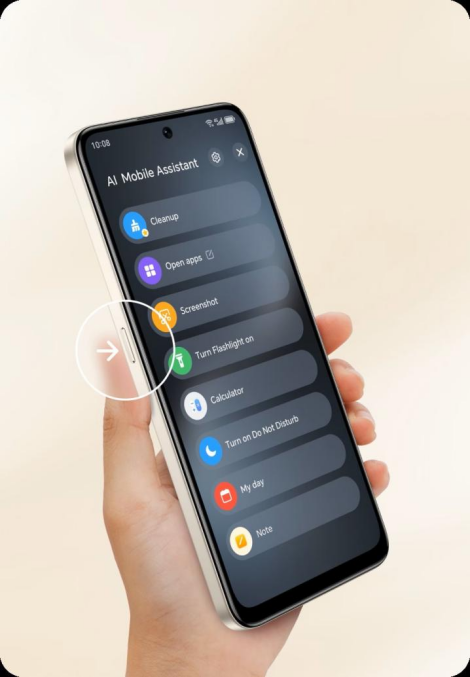
Smartphones like the HONOR 400 Smart phone incorporate advanced security features. Regular updates keep the device safe. This phone boasts a Qualcomm Snapdragon 685 CPU for top performance, while the MagicOS 9.0 system ensures seamless security. The fingerprint sensor adds an extra protection layer, keeping personal data safe. Its balanced combination of hardware efficiency and software safeguards makes it a dependable option for security-conscious users seeking long-term reliability.
Conclusion
Smartphone security requires continuous effort, from ensuring lock screen protection to managing app permissions. By choosing reliable devices and keeping software updated, you fortify your defenses against unauthorized access. Simple actions like enabling biometric authentication and selecting trustworthy download sources make a significant difference. Stepping up your smartphone security is more straightforward than it might appear. With informed choices and regular protective measures, you safeguard your device and data, maintaining privacy and security. Remember, the effort put into securing your smartphone today can prevent potential headaches tomorrow.